
Download MegaGet Streamer – video streaming, torrent streaming, watch movies, stream from torrent, no download, instant video, fast streaming, offline video, video player, stream without downloading
Overview
MegaGet Streamer is a mobile application designed to deliver a streamlined video streaming experience directly from torrent links or local storage. The app’s primary purpose is to eliminate the need for full downloads by enabling users to watch videos in real time, even on slower internet connections. This functionality makes it particularly valuable for individuals who face bandwidth limitations or prefer immediate access to content without waiting for lengthy downloads.
Target users include casual viewers, media enthusiasts, and anyone seeking a faster way to access video content. The app caters especially well to those who frequently use torrent links and want a hassle-free method to view their favorite movies, shows, or videos without committing to full downloads. By transforming torrent links into instant playback streams, MegaGet Streamer reduces friction in the viewing process, enhancing user satisfaction.
Originally developed as a Firefox extension, the application has evolved into a standalone mobile solution, reflecting its growing utility and adaptability across platforms. While the developer, MegaGet, has not provided detailed background information, the app’s long-standing presence since its release on February 11, 2015, suggests a stable and consistent development track record. The app operates within the productivity category, serving as a functional tool rather than a social or entertainment platform.
Within the broader mobile app ecosystem, MegaGet Streamer fills a niche for users seeking lightweight, efficient video playback solutions that prioritize speed and accessibility. Its ability to stream directly from torrent sources positions it as a unique utility in the space of multimedia players.
Key Features & Functionality
- Instant Torrent Streaming: Users can paste any valid torrent link into the app’s input bar and begin watching immediately. This feature bypasses the traditional download process, allowing real-time playback from the moment the stream initializes.
- High-Quality Playback: The app breaks video files into small data packets during streaming, which helps maintain consistent playback quality while reducing the strain on network resources. This is especially beneficial for users with unstable or low-speed internet connections.
- Minimal Download Requirement: Unlike conventional torrent clients, MegaGet Streamer does not require users to save entire files to their device. Only the necessary data for playback is processed, minimizing storage usage and time investment.
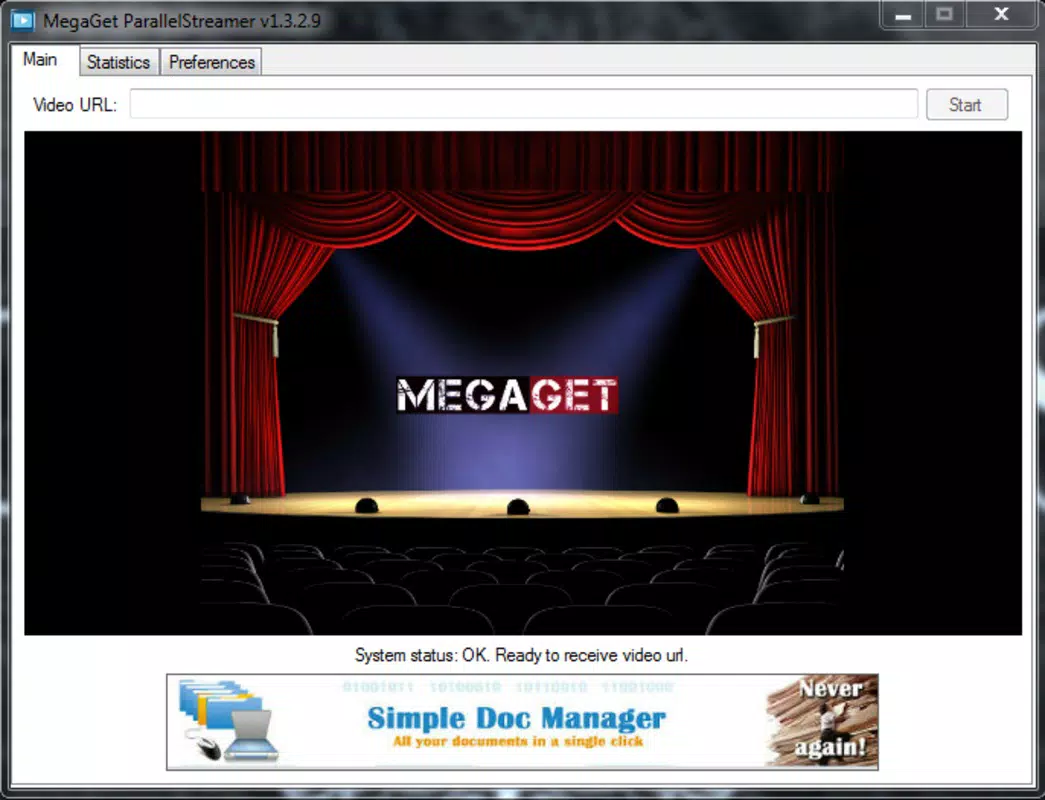
- Simple User Interface: The app features a clean, intuitive layout with a prominent input field at the top, making it easy to enter torrent links and start streaming with minimal effort.
- Offline Video Access: Once a video is streamed and cached temporarily, users may be able to access it later without re-downloading, though this depends on local storage retention policies and session persistence.
For example, a user with a 2 Mbps connection can start watching a 4K movie within seconds by entering a torrent link, avoiding the hours typically required for a full download. Similarly, someone traveling with limited data can use the app to stream content without exceeding their monthly cap, thanks to the minimal data overhead during playback.
Interface, UX & Performance
The user interface of MegaGet Streamer is designed with simplicity and functionality in mind. The layout centers around a single input field at the top, where users paste torrent links. Below it, playback controls and video display occupy the main screen, ensuring that all essential functions are immediately accessible. The visual style is minimal, with a focus on usability rather than aesthetic embellishment, which helps reduce distractions during playback.
Navigating through the app is straightforward: users enter a link, initiate playback, and control playback with standard play, pause, and volume functions. The app maintains a consistent flow, with no unnecessary steps or hidden menus. This streamlined experience is ideal for users who prioritize speed and efficiency over advanced customization.
Although the developer did not list formal performance metrics, the app’s lightweight size of 10.2 MB suggests optimized resource usage. It is expected to run smoothly on mid-range Android devices, though performance may vary depending on device capabilities and network conditions. Responsiveness appears to be strong, as the app allows instant initiation of playback after link input. Stability during extended streaming sessions has not been documented, but the app’s long-standing presence indicates a level of reliability.
Platform Compatibility & Technical Requirements
MegaGet Streamer is available exclusively on the Android platform. The current version is 1.0.2, and the app’s file size is 10.2 MB, making it a lightweight download suitable for devices with limited storage. The app is free to install and use, with no in-app purchases or subscription models reported.
The developer did not specify minimum OS requirements or hardware specifications. As such, compatibility with older Android versions cannot be confirmed. However, given its release date in 2015 and continued availability, it is likely compatible with Android 5.0 and above, though users should verify system compatibility through their device’s app store.
Users should ensure their device supports streaming from torrent sources, as this functionality may depend on underlying network and security settings. No additional permissions or third-party integrations were mentioned in the provided data.
Pros and Cons
Pros
- Enables instant video playback from torrent links without full downloads.
- Optimized for low-bandwidth environments, reducing strain on internet connections.
- Simple, intuitive interface designed for quick access and ease of use.
- Small file size ensures fast installation and minimal storage usage.
- Free to download and use with no hidden costs or ads reported.
Cons
- Specific compatibility requirements were not listed, limiting clarity for potential users.
- Performance on older or low-end devices has not been verified.
- Developer did not provide information on update frequency or long-term support.
- Streaming capabilities may depend on the availability and health of torrent sources.
- No official documentation or user guides were provided in the input.
FAQ
Is MegaGet Streamer safe to use?
The app itself is free and lightweight, but users should exercise caution when entering torrent links, as the content may not be legally licensed. The app does not host or distribute content, so responsibility lies with the user.
Can I stream videos from my computer using MegaGet Streamer?
Yes, if the video is accessible via a valid torrent link, the app can stream it directly. However, the app does not support direct local file access from a computer unless the file is shared through a torrent or network share.
Does MegaGet Streamer require an internet connection?
Yes, a stable internet connection is required to stream content from torrent links. The app cannot play videos without an active connection.
Is the app available on iOS?
Based on the provided information, MegaGet Streamer is currently only available for Android devices. No iOS version was mentioned.
How often is the app updated?
The developer did not specify update frequency. Users should check their device’s app store for the latest version and ensure they are using the most recent release for optimal performance.
Final Thoughts
MegaGet Streamer stands out as a practical and efficient tool for users who want to watch videos without the delays of traditional downloads. Its ability to stream directly from torrent links makes it a compelling choice for those with slow internet or limited storage. The app’s clean interface, lightweight design, and free access further enhance its appeal.
While the lack of detailed technical specifications and compatibility information limits full transparency, the app’s long-standing presence and consistent functionality suggest reliability. It is particularly beneficial for media consumers who value speed, convenience, and minimal resource usage.
For anyone seeking a fast, no-frills way to stream videos from torrent sources on Android, MegaGet Streamer delivers a straightforward solution. Its focus on instant playback and low overhead makes it a valuable addition to any mobile productivity toolkit.
Download MegaGet Streamer now


